
Real User Monitoring Smartboard
Catchpoint
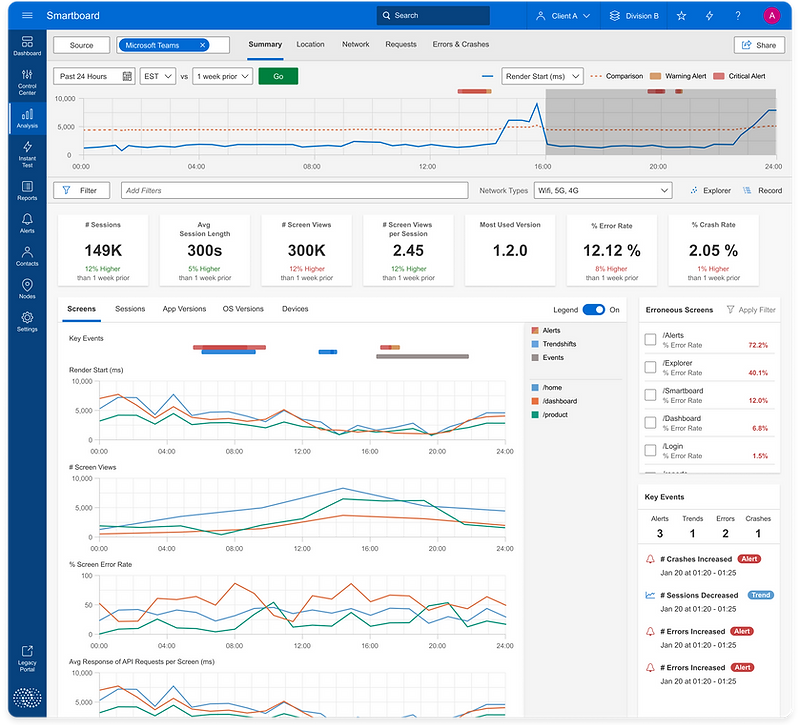
High-fidelity UI for RUM Smartboard
Context
The Goal
Reduce the average MTTD (Mean Time to Detect) and MTTR (Mean Time to Resolve) for IT teams to pinpoint and resolve performance problems within their Sites/Apps and increase Catchpoint’s competitiveness within the ever evolving Real User Monitoring domain space to help generate new sales leads and increase RUM ARR by 20%.
Catchpoint
Catchpoint is a SaaS Internet Performance Monitoring and Digital Experience Observability company that helps companies detect, diagnose, and prevent outages across the entire internet stack.
My Role
Discovery, user research, design,
prototyping, testing, QA
The Problem
Not being able to monitor performance for sites/apps effectively creates an inability for IT teams to efficiently pinpoint the cause and effect of performance changes within sites/apps creating a “monitoring blindness” that can lead to poor performance and unreliability creating user frustration and loss of traffic, transactions, and revenue.
The Team
UX Designer (Me)
Product Managers
Engineers
CTO
Account Executives
Introduction
In the domain of performance monitoring & observability, identifying performance changes and remediating problems is a pivotal task, particularly when optimizing performance for multiple sites/apps across a wide range of app versions, devices, and locations.
As lead product designer for the Real User Monitoring (RUM) products line, I undertook the challenge of elevating Catchpoint’s RUM offering by removing monitoring ambiguity to help address the distinctive needs of Site Reliability Engineers and IT teams.
This case study follow the discovery around the hypothesis that restructuring data in a pragmatic and focused workflow empowers IT teams to make effective performance improvements to sites/apps and optimize their MTTD/MTTR while troubleshooting problems, or better yet identifying performance irregularities before they become a problem for the end user.
We assumed that IT teams wanted to be able to split their monitoring strategies for each sites/apps into the difference vantage points of RUM monitoring - Pages, App Versions, Devices, OS Versions, Locations, Network performance, and Requests to better keep track of every dimension’s trending performance.
Before the team got started, I wrote out a research plan detailing what I thought I already knew about user behavior, as well as the questions I wanted to be answered.
-
SREs struggle with monitoring performance across multiple dimensions for multiple sites/apps
-
The organization of data has inefficiencies and missed performance trends
-
Goal: Design a restructured solution for efficient monitoring that can help teams pinpoint performance problems despite complex combinations of dimensions that can experience said problems.
Discovery
Discovery Sprints with Cross-Functional Teams
-
Participated in a collaborative discovery sprint involving PMs, engineers, the sales team, and domain experts.
-
Mapped out end-to-end user journey to understand existing pain points and potential opportunities.
Narrowing Down of Feature MVP Requirements and stretch goals
-
Analyzed outcomes of the discovery sprints to extract core feature requirements
-
Prioritized requirements based on their potential impact on end customer and business goals, as well as capacity constraints of our engineering team.
Research
Competitive Analysis

Working Hypothesis
To address the recurring challenges faced by IT Teams and to produce a focused solution, we established a working hypothesis for our project.
Our hypothesis posited that SREs and IT Teams, dealing with substantial daily and weekly code changes, deployments and updates to multiple sites/apps, would find it challenging to effectively monitor performance for all combinations of monitoring dimensions across every site/app.
Our proposed solution involved creating a centralized page that aggregates trending performance for each site/app, thereby equipping IT Teams with a valuable tool to streamline their monitoring strategies and improve diagnostic/remediation workflows while dealing with performance crisises.
User Interviews
In order to have more insight and substantiate the hypothesis, I remarked on a comprehensive research mission - IT professionals (SREs, Engineers, DevOps) in interviews to be reveal their pain points, workflow intricacies and the data they care most about.
The research unveiled a common theme:
-
Searching thru all dimensions and combinations and dimensions to pinpoint a problem is a daunting tedious task with increased pressure during a crisis/outage
-
Engineers expressed a need for a consolidated view of their site performance that would help them hone into performance issues quickly and effectively enabling them to optimize their time on their number one goal, improving and enhancing their sites/apps rather than spending all their time fixing problems.
-
Teams are able to gather the most meaningful information by tracking page/screen performance trends and high level user session data as poor performance on a page or an aggressive drop-off in user sessions is the quickest indicator to a problem/outage.
-
Engineers care most about the data they have control over such as specific page/screen performance, how a app version is functioning after a code release and how their site/app is functioning in specific geographical locations with high traffic.
User Needs & Business Goals
Research Insights
-
Users struggled with monitoring performance data for sites/apps across key vantage points in a effective way hindering MTTD/MTTR and overall site performance
-
A demand for a comprehensive interface was clear
-
Users sought features for easier monitoring and troubleshooting of sites/apps
-
More relevant and impactful data for analysis was crucial

Action Steps
-
Collaborated with previous stakeholders (PMs, engineers, CTO and Sales Team) for a feasible solution
-
Set requirements for the new RUM solution
-
Key Features identified:
-
Monitor overall performance trends for sites/apps
-
Track errors and crashes
-
Ability to view granular data at individual session level to be understand a problem occurring
Creating User Flows & Site Map
-
Developed a detailed user flow diagram to visualize the step-by-step user journey
-
Identified pain points, bottlenecks, and potential optimization points within the flow
-
Formulated clear and concise narratives to guide design and development efforts
Designing the data flow
-
A user-centric interface that is effective for monitoring and troubleshooting while building and maintaining sites/apps
-
Workflow and data structured in a meaningful format allowing IT teams to make actionable decisions on things they have the most control over
-
The design aligns with IT professionals need for actionable and impactful data, enhancing their productivity and incident remediation
-
The outcome is a comprehensive solution exemplifying the successful integration of user needs, data management, and design execution.
Design
Iterating on Use Flow Diagram with Feedback
-
Collaborated with PMs and engineering team to review the user flow diagram and data flow structure.
-
Incorporated technical insights and optimization suggestions into the diagram through interactive feedback loops.
Creation of Mid-Fidelity UI Screens
Guided by user insights and stakeholder feedback, I dived into the design phase. Starting with numerous structural ideas and data formatting, I envisioned a Real User Monitoring product experience elevated to be one of Catchpoint’s strongest product lines, effectively restructuring the way IT teams monitor and diagnose Real User data while managing the performance of their sites/apps.
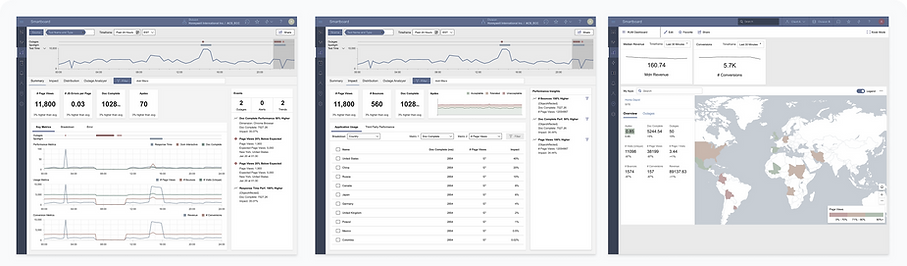


Iteractive Collaboration & Refinement Loops
-
Interactive feedback loops with SREs, DevOps professionals, internal stokeholders, and domain experts
-
Focused on:
-
Interface intuitiveness and strong navigation
-
Insightful and actionable data
-
Alignment with workflow requirements
-
Usability Testing
After completing the overall UI/workflow and successful alpha deployment, we conducted usability testing with our alpha users and domain experts. Thru multiple rounds of user testing we gathered detailed feedback to iterate on and expand our product offering. SREs engaged with the new interface, and their feedback provided invaluable insight into the efficacy of the centralized view in enhancing their monitoring and remediation strategies and what we could do to further improve upon our MVP.
Test Objectives
-
Test the ease of use and navigation of the RUM feature
-
Test the overall workflow and how our RUM tool integrates with their overall workflow
-
Observe any friction, frustration, or hesitation within user interactions
-
Gather any additional information around the data SREs use to monitor their sites
Test Conclusions
-
By incorporating insights from user research, iterative design, and cross-functional collaboration, a robust interaction framework was developed, prioritizing usability, relevance, and efficiency
-
This approach paved the way for smoother monitoring and diagnostic/remediation analysis, directly impacting user productivity and satisfaction
-
Through discovery and further conversations with users, we learned were additional areas of our feature that we could build out to further enhance our product to meet both user and business goals.
-
The success of the project extended beyond specific metrics, affirming effectiveness of the strategy in creating a foundational, user-focused design that resonates throughout the entire platform that could easily integrate into overall monitoring strategies for a broader audience of monitoring and observability professionals allowing for additional sources of revenue
Iteration & Additional Feedback
Following what we discovered thru user testing, there were additional areas of our feature we could add to create the most ideal monitoring solution for RUM IT teams. We learned thru discussion that tracking errors and crashes, and being able to track user journeys to help pinpoint pages with large amounts of errors/drop-offs would help users improve overall performance and stability of their sites’ and quickly figure out what types of problems are occurring during times of crisis.
User Journeys

Errors & Crashes

Final Thoughts
This was an incredible learning experience. I have definitely become a better designer through working hands-on with a cross-functional team and doing multiple rounds of usability testing directly with customers and domain experts.
I learned about the core of UX design as I kept my users at the center of every, single decision. It is so rewarding seeing users use my designs.
Final Results: SREs and IT Teams using our Real User Monitoring tool experienced a 20% decrease in the time required to diagnose and remediate site/app outages. Our overall portfolio of expertise customers using the RUM product line at Catchpoint grew by more than 50% within the first 6 months after launching our new Real User Monitoring Solution.
Key Takeaways
-
User-Centric Design: A holistic understanding of the SREs and DevOps professionals’ needs and pain points was crucial in developing a solution that is truly user-centric, addressing real problems and providing real value.
-
Collaboration and Iteration: Constant collaboration with cross-functional teams and iterative feedback loops with internal stakeholders, domain experts, and bookkeepers were essential in refining the designs and ensuring alignment with workflow requirements.
-
Data Relevance and Integrity: Introducing features like User Journeys and Error/Crash monitoring enabled users to further improve their site performance and stability, and allowed for more precise decision making while resolving problems with their sites.
-
Focus on Scalability and Adaptability: The design decisions taken were not only focused on addressing the immediate needs but also considered the long-term adaptability and scalability of the solution, making it future-proofed.
-
Empowered Decision-Making: By providing a consolidated and comprehensive view of sites/apps’ performance metrics and multitude of monitoring dimensions, the design enables IT Teams to make more informed and quick decisions, impacting the overall health of sites and apps positively.